- Sudan Clinic
- Patient Care & Portal
- Trusted Healthcare Anywhere
Patient Guide & Portal — Sudan Clinic
Your complete visual guide for the Sudan Clinic Patient App: from instant Telegram verification to scheduling top specialist video consults and digital wallet management.


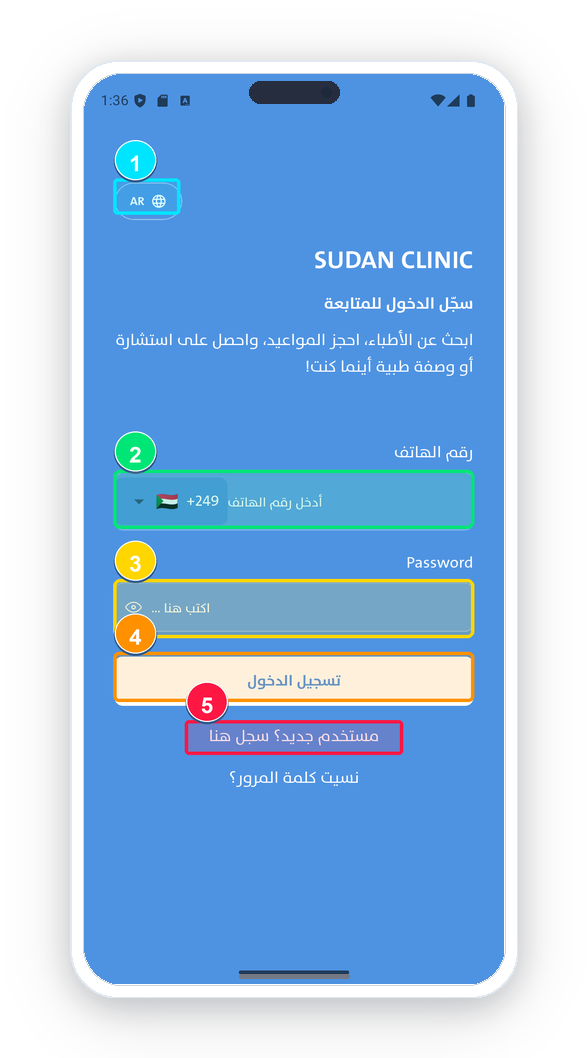
Patient Login & Language Selection
Branded, intuitive authentication for patients with instant multi-language support (Arabic, English, Russian).
Screen Elements Explained:
-
1
Language Switcher (AR / EN / RU): Toggle between languages with instant RTL/LTR responsive layout adjustments.
-
2
Phone Number Field: Enter registered mobile number with auto country dialing code (+249 or international).
-
3
Password Input: Secure encrypted password input with show/hide password toggle.
-
4
«Log In» Button: Instant authentication and access to your patient dashboard.
-
5
«New Account» Registration Link: Quick link to create a new profile for yourself or family members.
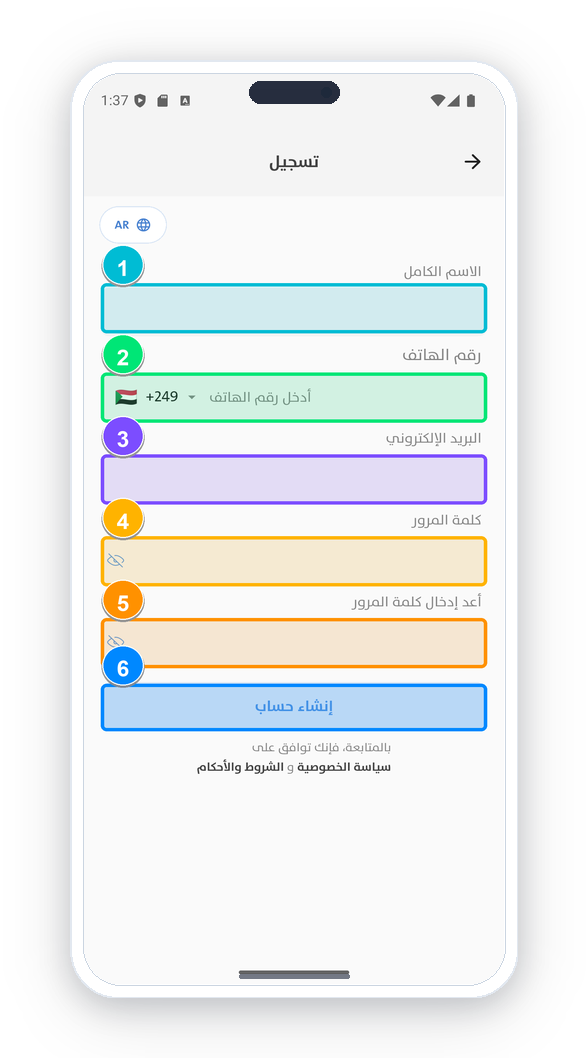
New Patient Account Registration
Create your secure digital health record in less than one minute.
Screen Elements Explained:
-
1
Full Name: Enter legal patient name (e.g., Ahmed Al-Sayed).
-
2
Phone Number: Direct mobile contact for real-time consultation notifications and OTPs.
-
3
Email Address: Email for digital prescriptions, consultation summaries, and transaction receipts.
-
4
Password: Create a secure password with at least 6 characters.
-
5
«Register New Account» Button: Submit details and proceed to instant Telegram OTP verification.
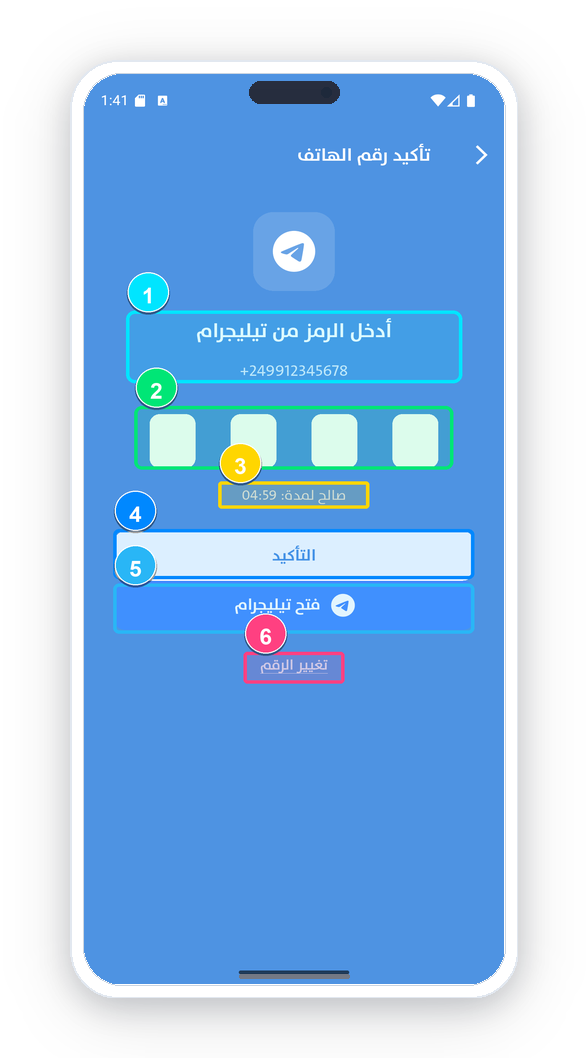
Phone Verification via Telegram OTP Bot
Next-gen verification via official Telegram Bot @SudanClinicVerifyBot to ensure zero SMS latency across all regions.
Screen Elements Explained:
-
1
Displayed Mobile Number: Verify the targeted mobile number for authentication.
-
2
4-Digit OTP Code Input: Enter the one-time password delivered via Telegram bot.
-
3
«Verify» Action Button: Validate the secret PIN and activate patient session.
-
4
«Open Telegram» Action Button: 1-click direct launcher to open @SudanClinicVerifyBot for immediate code generation.
-
5
Countdown Resend Timer: Allows requesting a fresh verification code when time elapses.
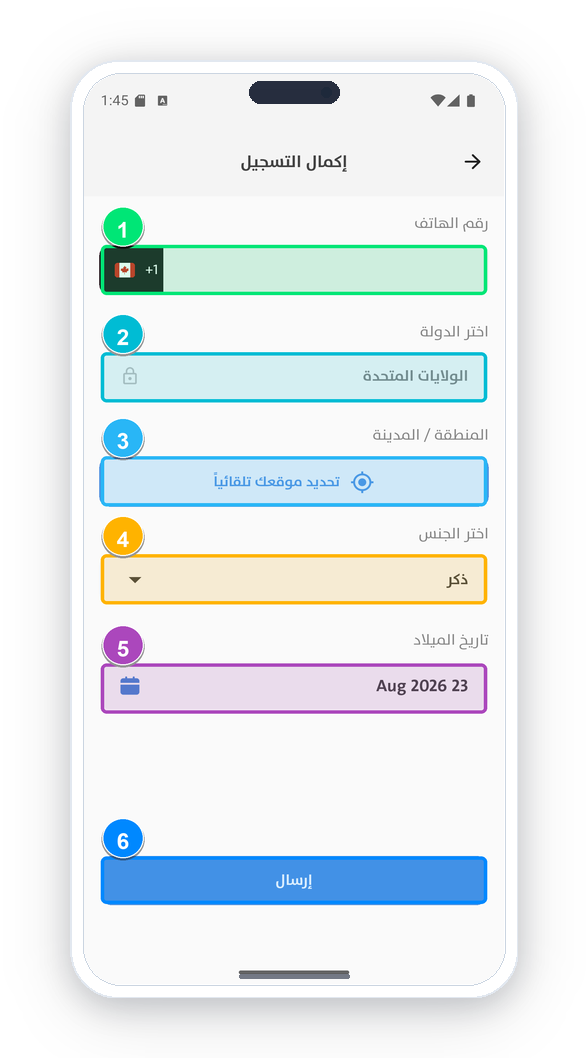
Profile Completion & Geographic Location
Specify your city, gender, and birth date to filter top local clinics and pediatric/adult specialists.
Screen Elements Explained:
-
1
Verified Contact Phone: Displays validated mobile number anchor.
-
2
Country of Residence: Choose Sudan or foreign country for Sudanese diaspora.
-
3
City & State Localization: Identify your state/city to locate the nearest specialized medical centers.
-
4
Gender (Male / Female): Biological gender categorization for clinical records.
-
5
Birth Date: Select birth date to assist dosage recommendations and age-specific doctors.
-
6
«Save & Continue» Button: Finalize onboarding and open the main dashboard.
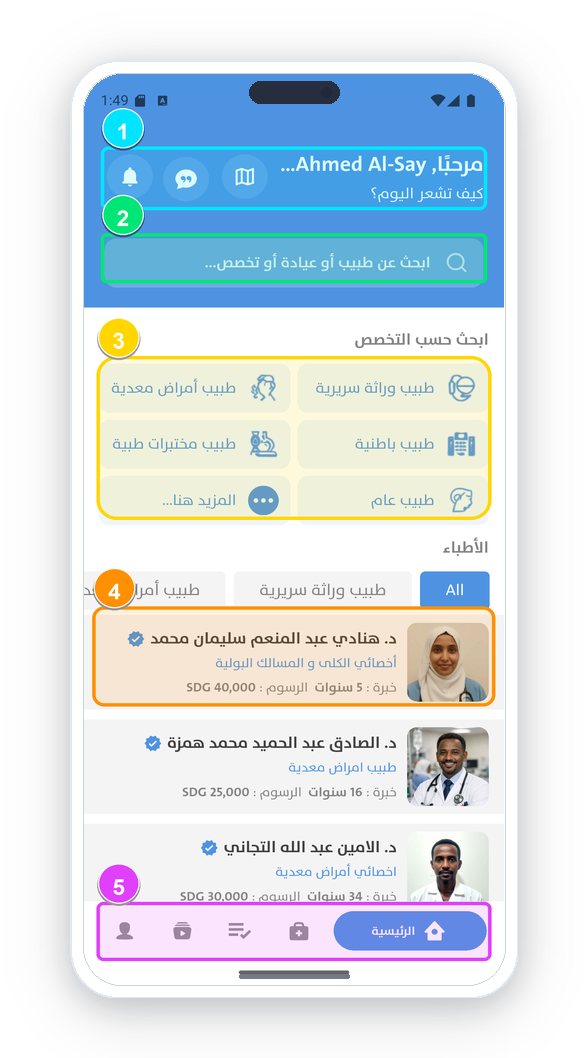
Patient Dashboard & Smart Doctor Search
The primary clinical center: dynamic search engine, medical specialties grid, and top-rated consultants.
Screen Elements Explained:
-
1
Header Bar & Notification Hub: Alerts, doctor chat box, and interactive clinic map.
-
2
Smart Search Bar: Instant search by doctor name, specialty, hospital name, or specific medical symptoms.
-
3
Specialties Grid: Quick tiles for popular medical branches (Cardiology, Pediatrics, Internal Medicine, etc.).
-
4
Featured & Top-Rated Doctors: Doctor cards displaying star rating, years of practice, clinic, and consultation fees.
-
5
Bottom Navigation Bar: Home, Specialties, Appointments, Educational Reels, and Profile.
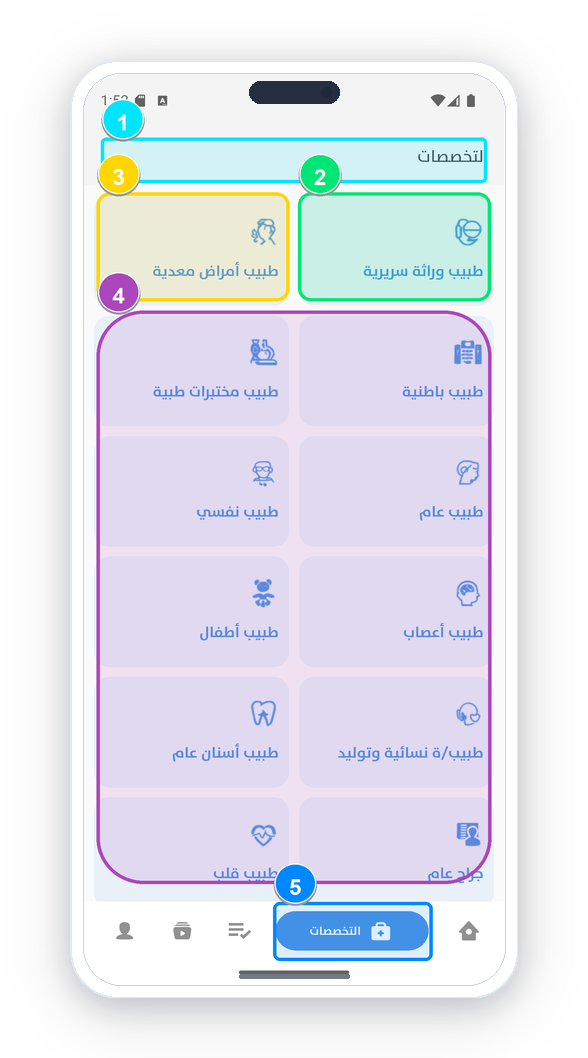
Medical Specialties & Department Catalog
A complete structured directory of all verified clinical disciplines available on the Sudan Clinic platform.
Screen Elements Explained:
-
1
Catalog Header: All Medical Disciplines & Specializations.
-
2
Internal Medicine & Surgical Fields: Infectious Diseases, Clinical Genetics, Internists, General Surgeons, and Cardiologists.
-
3
Family & Specialized Health: Pediatrics, OB-GYN, General Dentistry, and Medical Diagnostic Labs.
-
4
Psychiatry & Neurology: Mental Health, Neurologists, and Specialized Rehabilitation.
-
5
Instant Department Filtering: Tap any category to display currently active doctors and their available slots.
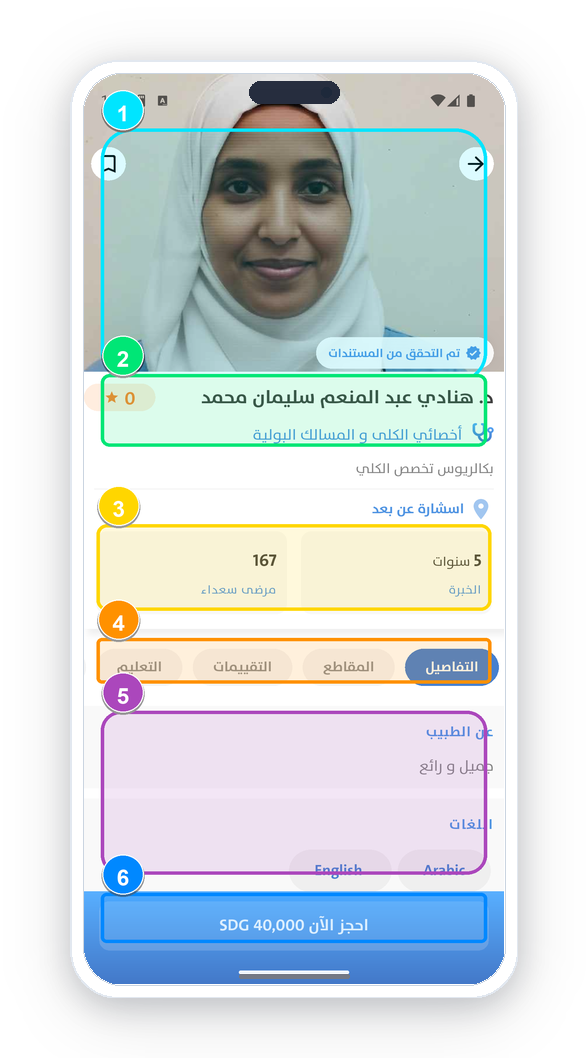
Doctor Profile, Verified Status & Patient Reviews
Verified profile for each medical consultant featuring degrees, actual patient ratings, and consultation rates.
Screen Elements Explained:
-
1
Verified Documents Badge: Official green verification stamp certified by Sudan Clinic Medical Administration.
-
2
Doctor Name & Clinical Title: Academic credentials, consultant level, and Medical Council ID.
-
3
Experience & Patient Metrics: Years of specialized experience and cured/treated patient count.
-
4
Profile Tabs: Details, Educational Video Reels, Patient Reviews, and University Degrees.
-
5
«Book Now» Button: Directly view live schedule and secure consultation booking.
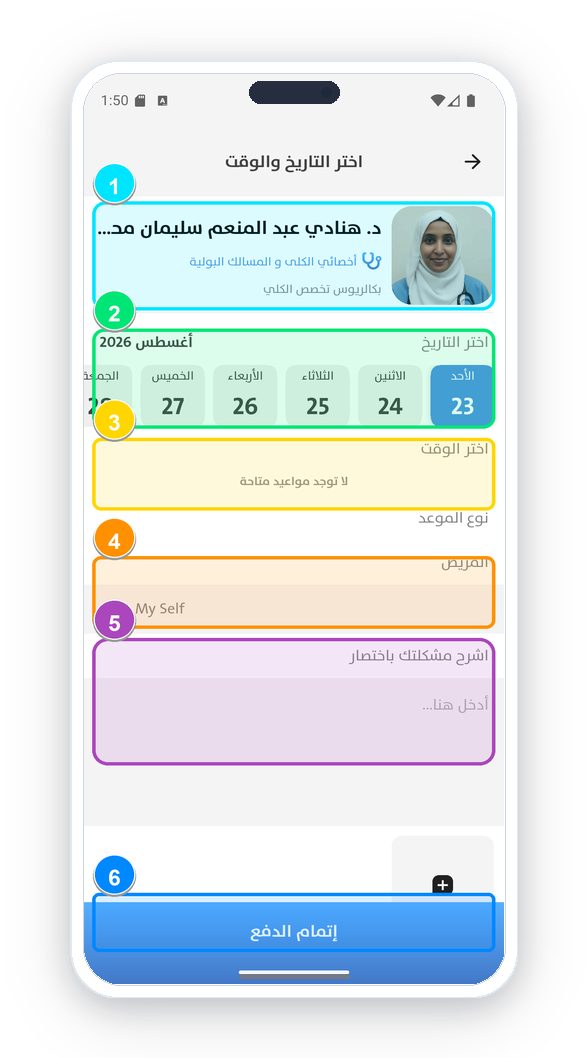
Appointment Scheduling & Symptom Upload
Schedule online video appointments or clinic visits, choose preferred time slots, and attach lab reports.
Screen Elements Explained:
-
1
Doctor Summary Card: Selected specialist info, clinical department, and verified fee.
-
2
Interactive Monthly Calendar: Select your desired day of the month for the medical consultation.
-
3
Available Time Slots: Select morning or evening appointment slot.
-
4
Select Patient: Book for yourself («My Self») or choose a family dependent.
-
5
Symptom Notes & Attachment (+): Type medical complaints and upload lab test images or past prescriptions.
-
6
«Complete Payment» Button: Finalize consultation booking via in-app wallet or payment gateway.
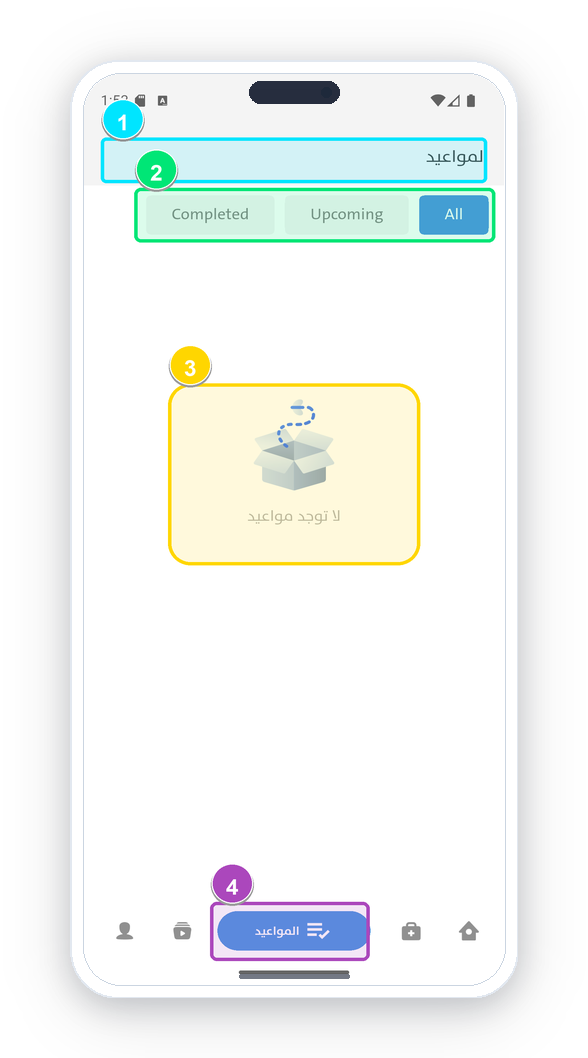
«My Appointments» & Secure HD Video Room
Manage upcoming consultations, join encrypted HD video sessions, and download electronic prescriptions.
Screen Elements Explained:
-
1
Appointments Dashboard: Unified management for all telemedicine and clinic appointments.
-
2
Status Tabs (Upcoming / Completed): Easily filter upcoming visits, active sessions, and past consults.
-
3
Video Call Connect Button: One-tap connection to private, end-to-end encrypted video consult room.
-
4
Digital PDF Prescription: Instant download of official doctor's prescription and medical report after consultation.
Personal Account & Unified Medical Record
Manage personal records, health timeline, and register dependents (children and elderly parents).
Screen Elements Explained:
-
1
Personal Profile Card: Patient name and phone with option to edit photos and medical profile.
-
2
Notification Settings: Manage appointment reminder push notifications and direct messages.
-
3
Saved Doctors & Wallet: Favorite consultants, in-app balance, and payment transaction logs.
-
4
Unified Health Record: Access historical diagnoses, diagnostic lab results, and previous prescriptions.
-
5
Family Dependent Management: Add family members (children, parents) to easily book on their behalf.

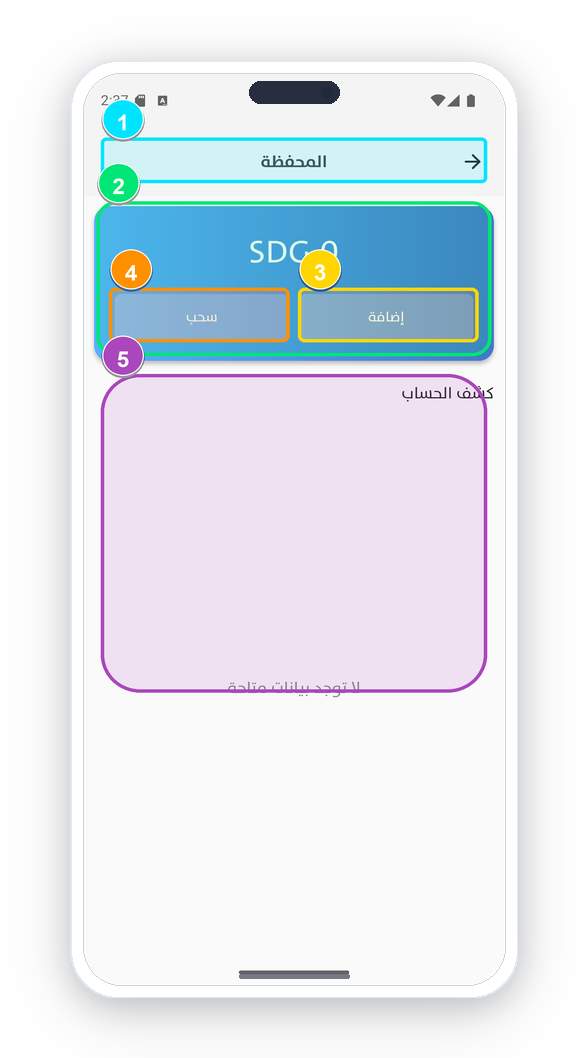
Digital Wallet, Balance Recharge & Payments
Pay consultation fees and top up your wallet via Bankak (Bank of Khartoum), Fawry, or supported local Sudanese bank transfers.
Screen Elements Explained:
-
1
Wallet Balance Overview: Displays current usable balance (SDG) with instant «Add Balance» button.
-
2
Recharge Amount Selection: Preset amounts (20,000 SDG, 60,000 SDG...) or custom input via «OTHER».
-
3
Payment Gateway Choice: Select Bankak (Bank of Khartoum), SyberPay, or domestic payment gateways.
-
4
Official Bank Account Details: Account details (A/C: 2265491 - Bank of Khartoum) with 1-click clipboard copy.
-
5
Upload Transfer Receipt: Attach transfer screenshot to have your balance credited immediately.